


Pricing & Billing
Credit Limits
PDF CreateMate charges credits based on what's inside your document. Every document starts at a base cost, and two things can increase that cost: too many placeholders and too many pages. This page explains exactly how those extra charges work.
Placeholder Limit
A placeholder is any HubSpot property mapped in your template (e.g. {{firstname}}, {{amount}}).
| Details | |
|---|---|
| Free allowance | First 10 placeholders included |
| Base cost | 100 credits |
| Extra charge | +1 credit per placeholder above 10 |
Examples
| Your Template | Placeholders Used | Extra Charge | Total Cost |
|---|---|---|---|
| Simple invoice | 8 | 0 | 100 credits |
| Detailed quote | 15 | 5 extra × 1 = 5 | 105 credits |
| Complex contract | 25 | 15 extra × 1 = 15 | 115 credits |
Page Limit
PDF CreateMate counts the pages in your uploaded template file.
| Details | |
|---|---|
| Free allowance | First 2 pages included |
| Base cost | 100 credits |
| Extra charge | +5 credits per page above 2 |
Examples
| Your Document | Pages Generated | Extra Charge | Total Cost |
|---|---|---|---|
| One-page letter | 1 page | 0 | 100 credits |
| Two-page contract | 2 pages | 0 | 100 credits |
| Five-page proposal | 5 pages | 3 extra × 5 = 15 | 115 credits |
| Ten-page report | 10 pages | 8 extra × 5 = 40 | 140 credits |
Full Cost Example
Here's what a real-world document with multiple features enabled looks like:
Template setup:
- 18 placeholders mapped (8 over the free limit)
- Estimated 4 pages (2 over the free limit)
- Signature enabled
- Cloud sync to Google Drive enabled
- Private document storage enabled
Credit breakdown:
| What | Credits |
|---|---|
| Base document | 100 |
| Extra placeholders (8 × 1) | +8 |
| Extra pages (2 × 5) | +10 |
| Signature | +200 |
| Cloud sync | +10 |
| Private storage | +3 |
| Total per document | 331 credits |
At scale (50 documents/month):
- 331 × 50 = 16,550 credits
- Standard rate: €165.50/month
- With volume discount (50,000+ credits): €124.125/month (25% savings)
Where to See Credit Costs in the App
Before Generating — Template Builder
Every template shows a live Credit Cost Summary panel. Open your template → Settings tab to see:
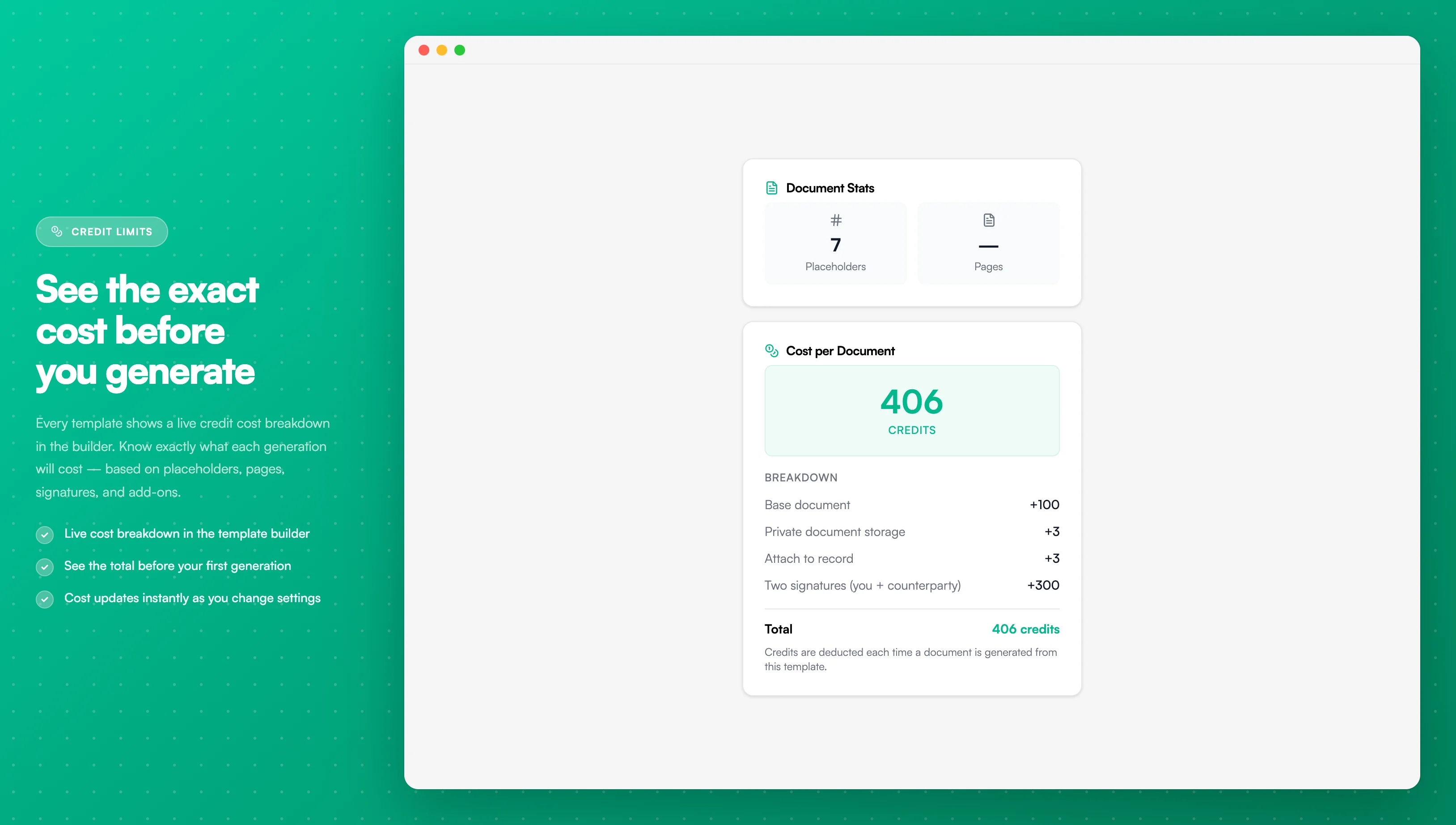
Image description
- Base document: 100 credits
- Private Document Storage: +3 credits
- Attach to record: +3 credits
- Two Signatures (you + counterparty): +300 credits
- Total: 406 credits per document
This panel updates instantly as you change template settings, so you always know what each generation will cost before you go live.
After Generating — Document History
- Go to Templates → open your template
- Click the Documents tab
- Check the Credits Used column for each generated document
- Click any document to see the full breakdown
Organization Balance
Go to Billing in the sidebar to see your overall usage:
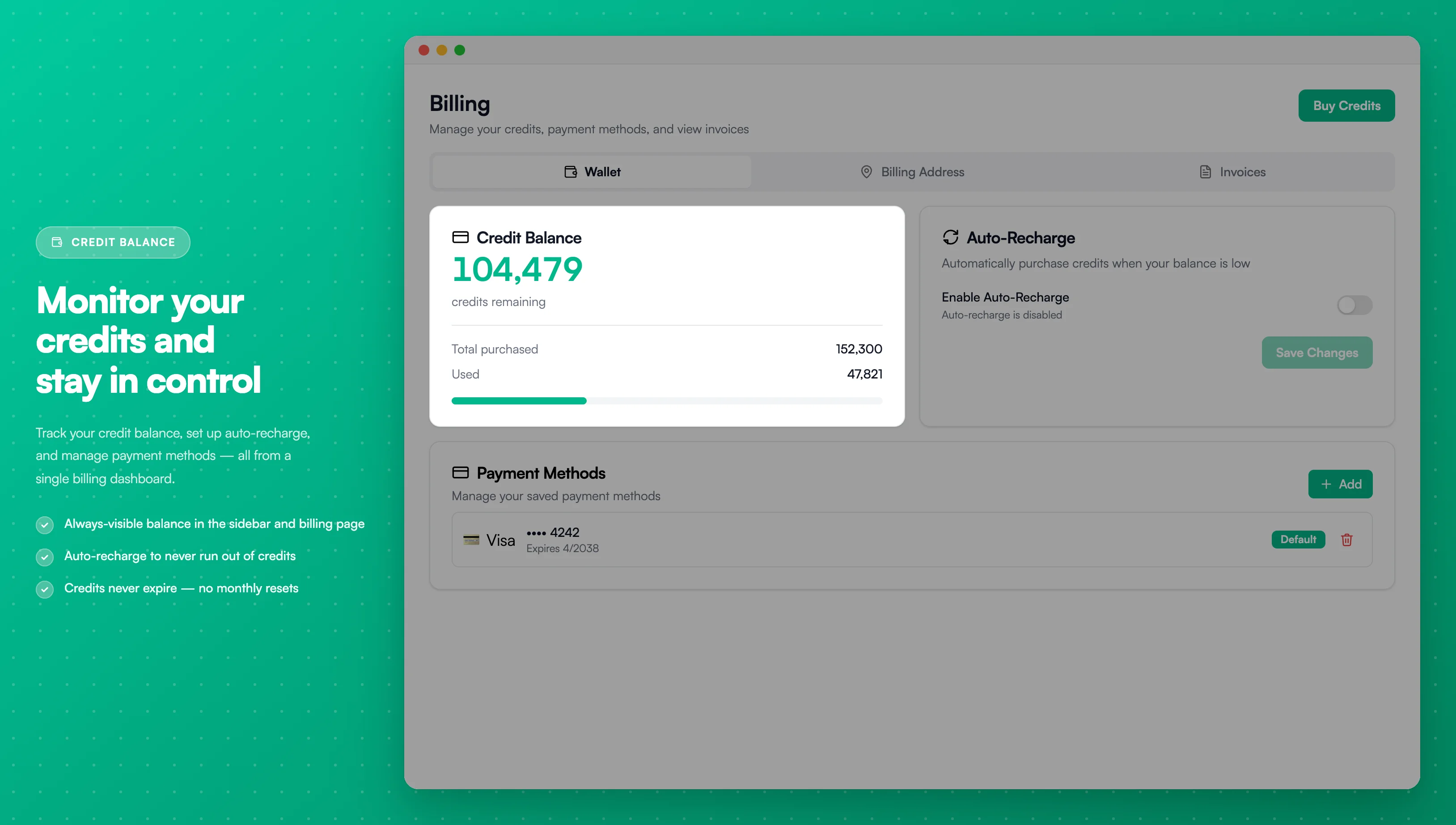
Image description
- Current balance remaining: 297,073
- Purchases remaining: 300,646
- Used: 3,573
How to Keep Costs Low
Reduce placeholder count
- Only place a placeholder where it is needed — every occurrence counts toward the total
- Don't repeat the same placeholder unless the content genuinely needs to appear in multiple places
- Use formatters to format a property's value inline (e.g. date formatting, number formatting) without adding extra placeholders
Reduce page count
- Keep your template concise — the page count is fixed at upload time based on the template file
- Remove unnecessary pages from your template before uploading
- Tighten margins to fit more content per page in the template itself
Grandfathered Organizations
If your organization was created before placeholder and page limits were introduced, you may have unlimited placeholders and pages at no extra charge.
To check your status:
- Go to Billing in the sidebar
- Look for a "Grandfathered Pricing" or "Unlimited Features" badge
- Or contact support to confirm
Frequently Asked Questions
What counts as a placeholder?
Every time a placeholder appears in your document. If you use {{firstname}} in 10 places, it counts as 10 placeholders — not 1.
Do placeholders in hidden conditional blocks still count? Yes. All mapped placeholders count toward your limit, even if they're hidden for some contacts.
Can the same template have different costs for different contacts? Yes — if your template uses conditional blocks or dynamic tables, some contacts will produce more pages than others. The credit cost is calculated per generated document.
Are charges per template or per document generated? Per document generated. Generating the same template 50 times = 50 separate credit charges.
Can I see the cost before generating at scale? Yes. The Credit Cost Summary in the template builder shows the exact credit cost based on your current template configuration.
What happens if I run out of credits mid-generation? New generation requests are saved with pending status and are not processed until credits are added. A low-credits warning appears in the sidebar when your balance is estimated to last fewer than 14 days (only shown when auto-recharge is disabled). Purchase credits and use the Retry action in the template list to process pending documents.
Related Documentation
- Plans & Credits - Credit pricing and volume discounts
- Credit Balance - Track usage and purchase credits
- Number Formats - Format property values inline
- Conditional Blocks - Control which content appears per contact